Post

Log inSign up

Post

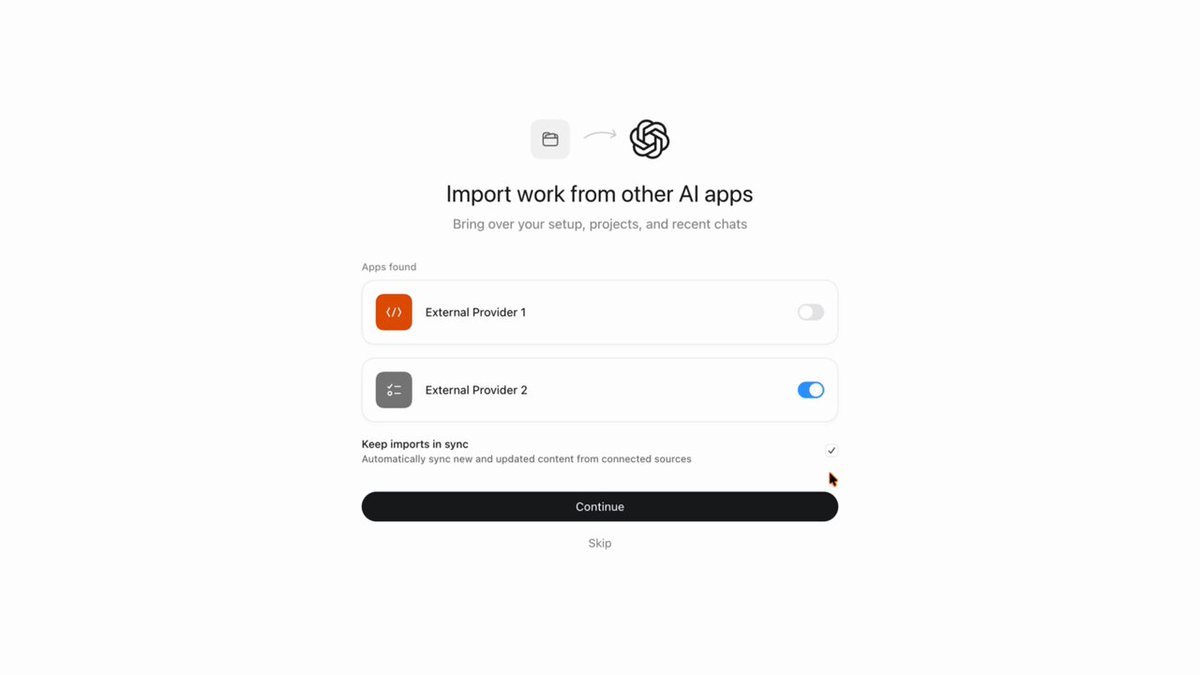
OpenAI Developers on X: "You can now keep your work from other agents in sync with ChatGPT Work and Codex. Import projects, chats, skills, and plugins, review your import history, and opt in to automatic updates in Settings. Now available in the ChatGPT desktop app."

  • user avatar
    OpenAI Developers
    OpenAI
    @OpenAIDevs
    You can now keep your work from other agents in sync with ChatGPT Work and Codex. Import projects, chats, skills, and plugins, review your import history, and opt in to automatic updates in Settings. Now available in the ChatGPT desktop app.
    00:00
    6:20 PM · Aug 11, 2026938.9KViews
  • user avatar
    OpenAI Developers
    OpenAI
    @OpenAIDevs
    Aug 11
    More on bringing your existing workflow into Codex:
    user avatar
    OpenAI
    @OpenAI
    May 1
    Bring your workflow to Codex in just a few clicks. Import settings, plugins, agents, project configuration, and more so you can keep working with fewer interruptions. Your move.
    00:00
    user avatar
    OpenAI Developers
    OpenAI
    @OpenAIDevs
    Aug 11
    Here's how you can set up automatic syncs:
    Import from another agent | ChatGPT Learn
    Import from another agent | ChatGPT Learn
    From learn.chatgpt.com
  • user avatar
    bitslix
    @bitslix
    Aug 11
    What I need is session transfer from CLI! I have 2 Devices where I working on my projecst, when my child is on my main PC i'm on my Notebook, but I have always the problem that the sessions are not on there and continuing then is harder. Do you plan something like save of

Log in or sign up for X

See what’s happening and join the conversation

Continue with phone
or
Log in with username or email

Relevant people

Avatar
OpenAI Developers@OpenAIDevsFollow
Official updates for developers building with Codex & the OpenAI Platform • Service status: https://t.co/kZwnwdYYEq

Trending now

Terms·Privacy·Cookies·Accessibility·US TIDA·Ads Info·© 2026 X Corp.